
No products in the cart.
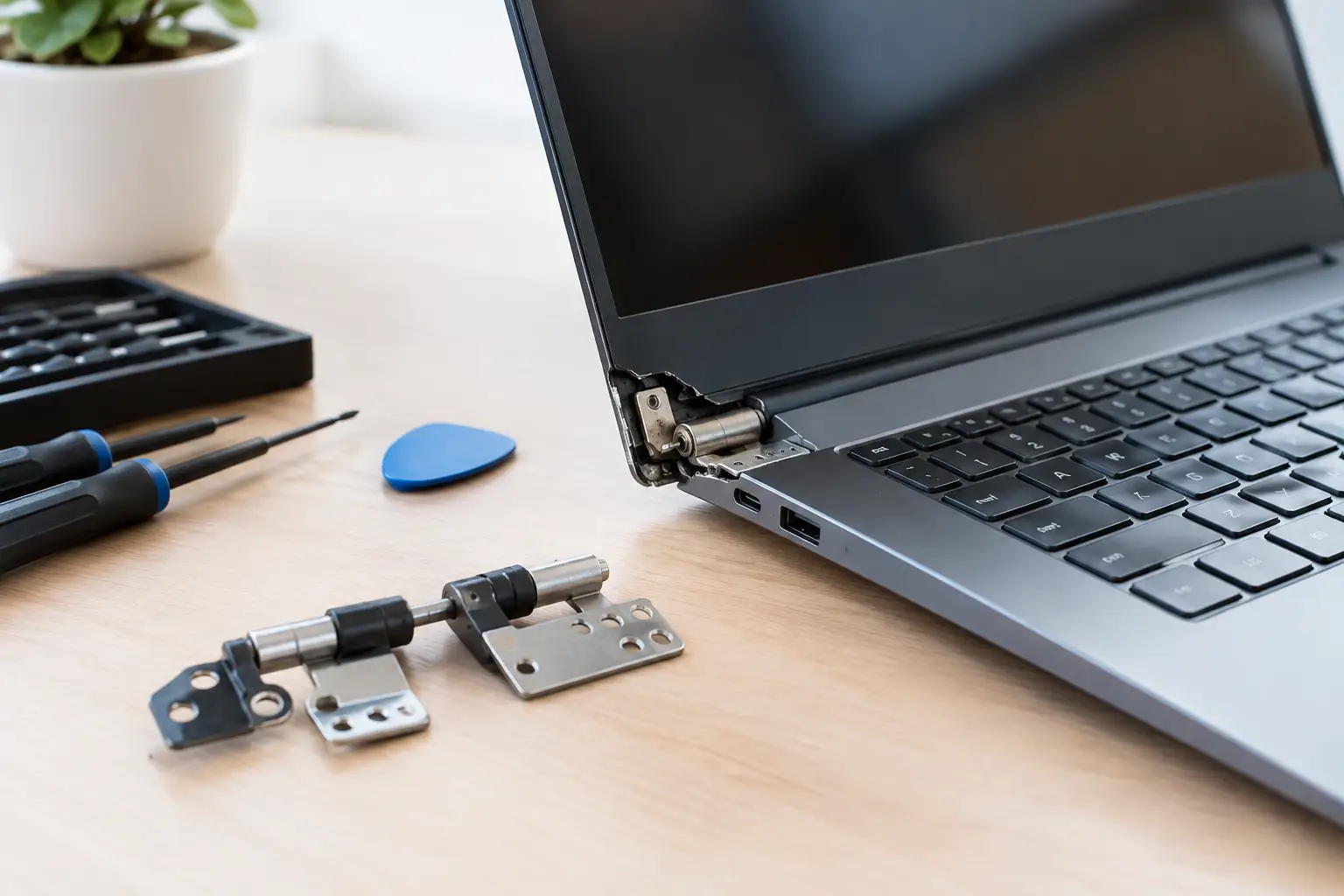
A laptop hinge rarely fails all at once. First, the screen may feel stiff when you open it. Then you notice a small gap near the corner, hear a pop, or see the plastic case lift away from the display. These broken hinge repair examples show why acting early can protect your screen, webcam cable, and laptop body from more expensive damage.
For most people, a damaged hinge is not just a cosmetic issue. It can make opening the laptop risky, affect the screen position during work or class, and eventually pull cables or mounting points apart. A fast diagnostic can identify whether the problem is limited to the hinge itself or has spread into the display assembly or lower case.
Laptop hinges are compact metal mechanisms that connect the display to the base. They are designed to hold the screen at a useful angle, but they rely on small screws, plastic mounting posts, brackets, and case panels around them. When one of those supporting pieces breaks, the hinge can still feel tight – but it is no longer anchored correctly.
Common warning signs include a screen that wobbles, a corner of the laptop separating when opened, cracking sounds near the hinge, or a display that only stays in place at certain angles. Some customers also notice the screen flickering as they move it. That can mean the hinge damage is placing stress on the display cable.
Do not keep forcing a stiff hinge open and closed. The extra pressure can turn a repairable mount issue into a cracked screen, broken bezel, or damaged internal cable. If your laptop must be moved before service, close it gently, support both sides of the display, and avoid carrying it by the screen.
The right repair depends on what actually failed. A technician needs to inspect the hinge tension, mounting points, screen assembly, and lower case before recommending parts. Here are the repairs seen most often.
Sometimes a laptop screen starts feeling loose because hinge screws have backed out or the small metal bracket has bent after a drop. The screen may lean backward too easily or shake when you type.
In a straightforward case, the repair involves opening the laptop safely, securing the hinge hardware, and replacing the bracket or hinge if it no longer moves correctly. This is usually a better outcome than a full display replacement, especially when the screen, bezel, and cable are still intact.
However, a loose screw can also be a symptom rather than the root cause. If the screw mount beneath it has cracked, simply tightening the screw will not provide a lasting fix. That is why a proper inspection matters.
This is one of the most common broken hinge repair examples. The metal hinge may be fine, but the plastic posts or mounting points inside the laptop base have broken away. When you open the device, the corner of the keyboard deck or bottom cover may separate and rise with the screen.
A dependable repair may require replacing the affected lower case, palm rest, or keyboard housing, depending on the laptop model. The technician then installs the hinge securely into a sound mounting surface and checks that the display opens smoothly without stressing the new part.
A temporary adhesive fix can seem tempting, but it often fails under the repeated force of opening and closing the laptop. Replacement housing parts cost more than a quick patch, but they are typically the smarter option when you need a repair that holds up through daily use.
If the top corner of the screen cover is pulling apart, the hinge may have damaged the display back cover or lid. You may see a visible gap behind the screen, a lifted bezel, or a corner that flexes each time you open the laptop.
The repair can involve replacing the damaged cover, hinge, and bezel as needed. On some models, these parts are closely integrated, so the technician may recommend replacing the complete display assembly if individual parts are unavailable or if the panel itself has been affected.
This is where the cost can vary. Replacing only a cover and hinge is often more affordable than installing a complete screen assembly. But if the screen is cracked, flickering, showing lines, or separating from its frame, repairing the structure without addressing the panel may not be enough.
A hinge problem becomes more urgent when the display cable is being stretched or pinched. Symptoms can include a screen that goes black at certain angles, flickering, colored lines, webcam failure, or intermittent backlight problems.
In this situation, the repair starts with stabilizing the hinge and mounting points. The cable is then inspected for tears, pinches, or loose connections. If it is damaged, it may need replacement. If the display panel has already been affected, screen replacement may also be necessary.
Continuing to adjust the screen to find the “right” angle can worsen cable damage. If your display changes when you move the lid, keep the laptop as still as possible until it can be checked.
A laptop dropped on a corner may have more than one problem. The hinge could be bent, the lower case could be cracked, and the screen may be under stress even if it still turns on. This type of damage calls for a full physical inspection, not just a hinge adjustment.
A technician should check the lid alignment, display function, charging port area, keyboard deck, and internal battery for signs of impact. Repairing the hinge while overlooking a bent frame or loose battery connector can create another problem later.
Online repair videos can make a hinge replacement look simple, but laptop construction varies widely. Some devices use hidden clips, adhesive-secured screens, fragile bezel tabs, or screws of several different lengths. Using the wrong screw in the wrong place can damage a motherboard, puncture a battery, or crack a display.
The bigger issue is force. A hinge that is too tight can break fresh mounting points. A hinge that is too loose will not hold the screen correctly. A professional repair involves checking resistance, alignment, cable routing, and structural support before the laptop is reassembled.
If you are dealing with an older laptop, there is also a practical cost question. Repairing a housing and hinge is usually worthwhile when the device otherwise works well and meets your needs. If it also needs a screen, battery, keyboard, and major internal work, a technician can help you compare the repair cost with replacement options honestly.
A reliable repair should begin with a diagnostic, not a guess. The technician should identify whether the failure is in the hinge, the hinge mounts, the cover, the display cable, or a combination of parts. You should receive a clear explanation of the recommended repair and expected cost before work begins.
The repair itself may include replacing damaged hinges, installing a new bottom case or display cover, securing cable routing, and testing the screen at multiple opening angles. Before you leave, the laptop should open and close smoothly, sit at a stable viewing angle, and show no separation around the repaired area.
At iFix Hub, customers can bring in laptops with loose screens, cracked hinge corners, or display problems for a free diagnostic. Certified technicians can explain the damage clearly and recommend the most practical repair using quality parts and warranty-backed service.
A broken hinge does not have to become a broken laptop. Stop using force, protect the screen during transport, and have the damage checked while the repair is still focused on the hinge instead of the entire display assembly.



Need help? Our team is just a message away