

No products in the cart.
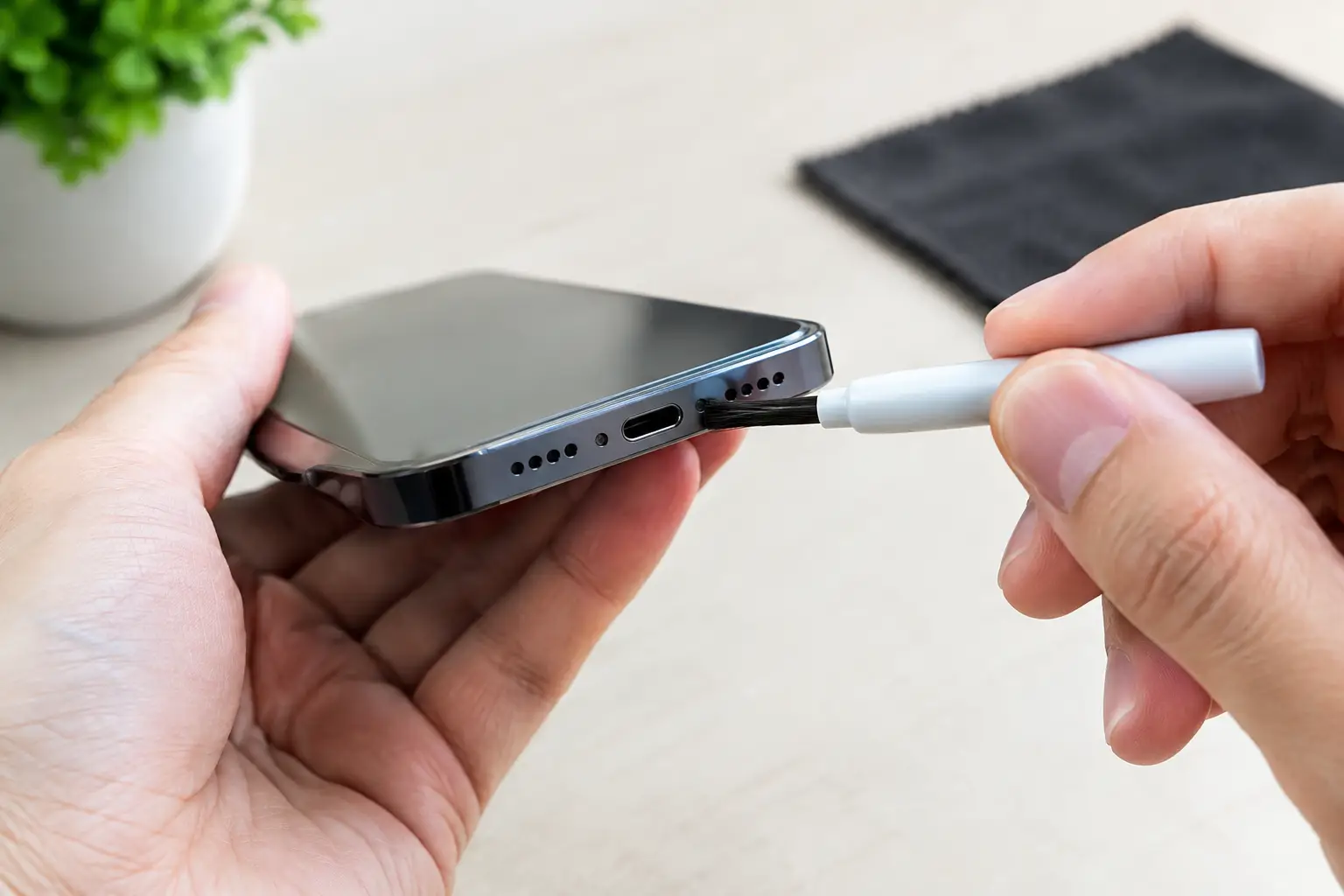
A phone that only charges at a certain angle is rarely having a “bad cable” day. More often, the charging port is packed with the pocket lint, dust, and debris that builds up over months of daily use. Knowing how to clean phone ports safely can restore a firm cable connection and save you the frustration of a dying battery when you need your phone most.
The key word is safely. Charging ports contain small, delicate contact pins. A rushed clean with a metal tool, too much force, or the wrong liquid can turn a simple lint problem into a port repair. Start gently, stop if anything feels stuck, and get a professional diagnosis when cleaning does not solve the issue.
Your phone spends a lot of time in pockets, bags, cars, on desks, and near food, makeup, pet hair, and dust. Each time you plug in a charging cable, the connector can push tiny particles farther into the port. Over time, that debris forms a compact layer at the bottom.
When lint blocks the cable from seating fully, the connector may look plugged in but fail to reach the charging contacts properly. You might notice slow charging, charging that cuts in and out, a cable that feels loose, or a phone that will not recognize a wired accessory.
This applies to USB-C ports, Lightning ports, and older Micro-USB ports. Headphone jacks can collect debris too, although they need slightly different care because their shape is deeper and narrower.
Turn the phone completely off before you begin. Remove the charging cable, take off any case that gets in your way, and work somewhere bright. A flashlight can help you see whether the problem is lint, sand, a bent contact, or signs of corrosion.
Do not plug the cable back in until the port is clean and fully dry. If your phone recently got wet, do not attempt to scrape inside it. Moisture and power do not mix, and debris may not be the real problem. Water damage needs proper inspection before charging is attempted.
You only need a few simple supplies:
Avoid paper clips, sewing needles, safety pins, knives, tweezers, and other metal objects. They can scratch contact pins, bridge electrical connections, or permanently damage the inside of the port. Toothpicks are often suggested online, but wood can splinter and leave more material behind. A purpose-made plastic pick is the safer option.
Start by holding the phone with the port facing downward. This lets loosened debris fall out instead of being pushed deeper inside.
Use the flashlight to inspect the port. If you can see a gray or dark mat of lint at the bottom, that is likely the culprit. Do not jab at it. Place the plastic pick gently along one inside wall and use small, controlled sweeping motions to loosen the buildup. Work slowly around the edges rather than pressing directly into the center, where the contact pins sit.
After a few light passes, turn the phone port-side down and tap it gently against your open palm. Use a soft, dry brush to sweep away debris near the opening. Repeat only as needed. The goal is to remove lint in thin layers, not dig aggressively until the port looks spotless.
Once the visible debris is gone, wipe the outside of the phone with a microfiber cloth. Turn it on and test with a cable you know is in good condition. The plug should sit firmly in place without excessive wiggling. If the phone starts charging normally, you have likely fixed the problem.
Compressed air seems like a quick fix, but it is not always a good one. High-pressure air can force lint farther into the port, move moisture where it does not belong, or leave behind propellant residue if the can is tilted. It can also make loose debris harder to remove.
A soft brush and careful, non-metal pick give you much more control. For most everyday lint buildup, that is all you need.
Never pour water, screen cleaner, or household cleaning sprays into a phone port. Even small amounts can create corrosion or short-circuit risks. Rubbing alcohol is sometimes used by repair technicians in controlled situations, but it is not the first choice for routine home cleaning. If you use any liquid at all, it must be electronics-safe, used sparingly, and allowed to dry completely before the phone is powered or charged.
For a dry, lint-filled charging port, dry cleaning is safer and usually more effective.
A clean port cannot repair worn-out charging contacts, internal cable damage, battery failure, software glitches, or liquid corrosion. If the cable still feels loose after you remove debris, do not keep pushing it in harder. That pressure can make a damaged port worse.
You should arrange professional help if your phone gets hot while charging, shows a moisture warning, charges only after repeated reconnecting, will not fast charge, or has visible green, white, or black residue inside the port. These can be signs of corrosion or a damaged charging assembly rather than simple dirt.
Also test a second cable and wall adapter before assuming the phone is at fault. Cables wear out, especially near the connector ends. If another certified cable works perfectly, replacing the old cable may be the fastest and most affordable answer.
A little prevention reduces how often you need to clean your phone port. Keep your phone out of loose, lint-heavy pockets when possible, especially if you carry tissues, receipts, or coins. Clean the outside of your charging cable connector occasionally with a dry microfiber cloth, since it can carry debris back into the port.
If you work outdoors, travel frequently, or spend time around sand, dust, or pet hair, consider using a protective port cover when the phone is not charging. Wireless charging can also reduce daily wear on the physical port, provided your phone supports it. It is convenient, but it will not solve an existing charging-port issue and may charge more slowly than a wired connection.
If you have cleaned the port carefully and your phone still will not charge reliably, a free diagnostic can prevent guesswork and unnecessary replacement costs. A trained technician can check whether the issue is debris, damaged pins, corrosion, the battery, or the charging cable itself.
At iFix Hub, customers can get fast, in-person charging port diagnostics and same-day repair options for many common phone problems. Certified technicians use quality parts and explain the fix clearly before work begins, so you can decide with confidence instead of risking more damage at home.
Your phone should not need to be balanced on a desk, twisted at an angle, or held just right to charge. Clean gently, test with a reliable cable, and when the problem persists, get it checked before a small connection issue leaves you without the device you rely on every day.


Need help? Our team is just a message away